 Somvia
Why I wanted my agent to see my data
I run my own AI assistant, Hermes, and talk to it through a messaging app on my phone. Hermes is an open-source agent from Nous Research. It works with different models, can call tools and keeps a long-term memory.
I talk to it about work, my calendar, things I read and things on my mind, and that includes how my body feels and what I am training for. It already knows a fair amount about me, so I wanted it to look at my training and help me plan it.
To get it to look at a single workout, though, I still had to send the workout first. From our conversations it knew my goals and how sessions felt. It could not see the heart rate, pace and sleep data my Apple Watch records. I had to find the workout in Apple Health on my phone and send screenshots, and comparing several workouts meant finding each one in turn.
I wanted Hermes to look up any workout we were talking about on its own, and to keep looking through older ones when it needed to compare, without me collecting everything and sending it over each time.
So I built Somvia. It reads Apple Health, turns the data into records an agent can query, and makes them available over MCP (Model Context Protocol, a standard way for an agent to call outside tools). Any agent that supports MCP can use it. I use Hermes, so the rest of this page describes Hermes, and the last section covers other agents.
Asking my agent about my training
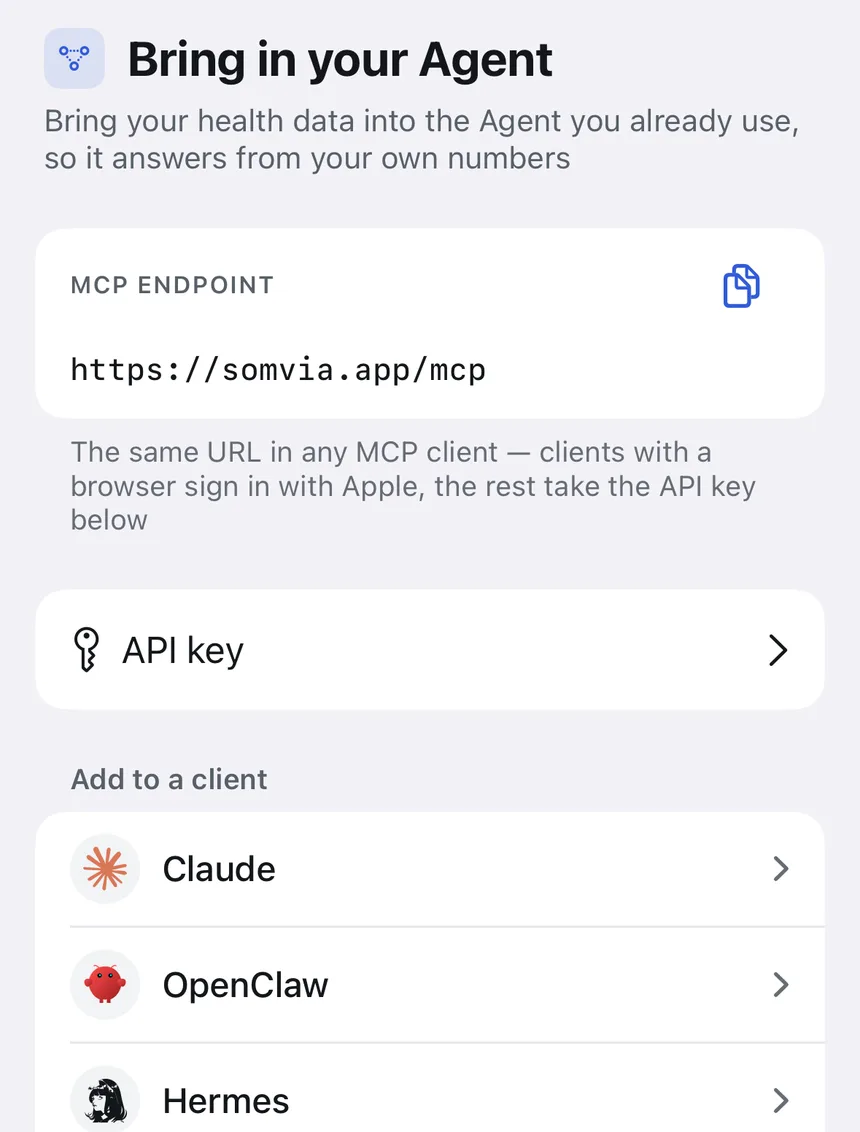
In Somvia I allowed access to Apple Health, turned on sync, and added the MCP address and API key from the app to Hermes. Synced data is stored on Somvia's server, and Hermes reads it through that connection.
Once it was connected, I went on talking to Hermes about training in the same chat. Over MCP it can list my workouts, read the splits and curves of any one of them, and look up sleep and body measurements, so I no longer send screenshots first.
In one session I ran about 900 m, then did lunges, the SkiErg, medicine ball and sled. When I got to the second run I could only manage about 600 m before I had to stop. I told Hermes what happened and asked it to go through my workouts and tell me how I should change my training.
It pulled a run of 16 consecutive workouts: 6 Functional Strength Training, 5 Mixed Cardio, 4 runs and 1 HIIT session. From those records and what I had told it, it put three things first: more easy aerobic work, running more often, and being able to keep running after other movements.
- Functional Strength Training6
- Mixed Cardio5
- Running4
- HIIT1
It kept CrossFit and HYROX in the plan. Each week has two CrossFit sessions and one HYROX session, plus one easy run and one quality run, with time left for recovery. The two runs have different jobs: the easy one is at a pace where I can hold a conversation, and the quality one is a threshold run or intervals.
The plan also covers how the sessions fit together. If a HYROX session is coming up and the CrossFit class before it has a lot of front squats, lunges or heavy sled work, it suggests using less weight or fewer reps so I have something left for the next session. For running out of legs mid-session, it suggests watching the second half of sessions with similar content and length, to see whether the new schedule helps.
Writing down what each session was
My CrossFit and HYROX sessions change every time: different movements, weights and sets. To follow advice like the above, I need to know what I actually did. I also wanted a record of what I did and how it went, so I could look back later.
One session was front squats at 80 kg for 4 sets of 8, plus front-rack split squats at 40 kg. Another had strict presses, push presses, and squat clean, front squat and push jerk complexes done unbroken at 55 kg. On the watch both are called Functional Strength Training. From the name, duration and heart rate alone, I could not tell them apart later.
So I added workout notes to Somvia. Under each workout I can write the movements, weights, sets and how it felt. For the session where I stopped on the second run, I wrote down both run distances, the lunges, the SkiErg, the sled and the rest. When Hermes looks that workout up over MCP, it reads the note along with the data.
I can also do this in chat: I send Hermes what I did and ask it to save it as the note for that workout. It writes the note over MCP, the note shows up in the app, and it comes back with the workout the next time anyone looks it up.
Beyond what each session was, I wanted Hermes to keep my goals in mind. I want to run better while I keep doing CrossFit and HYROX, for example. Somvia's health memory holds this kind of long-term information, and it also has room for injuries, medication and training preferences.
I can write notes and memories in the app, or ask an agent to save them. The agent repeats what it is about to save, then writes it over MCP. When we talk about the plan later, it can look this background up. Because it lives in Somvia, any other agent I give access to can read it too, and I do not have to explain it again. Work, my calendar and the rest of my life I still talk to Hermes about, and it keeps those in its own memory.
Training load and recovery
With the records and notes in place, I also needed to account for how hard each session was and how recovered I was. An hour of easy running and an hour of hard intervals are not the same load. Somvia estimates the load of each workout from its heart rate, pace or power, where Apple Health has them, then works out long-term and recent training load, so I can see how my current training compares with what I usually do.
For how my body is doing, there is the recovery score. It combines heart rate variability, resting heart rate, sleep and training load, and compares heart rate variability and resting heart rate with my own usual values. The app shows each measurement and how far it is from usual. The sleep score also looks at how long I slept, how regular my bedtime is, how often I woke, sleep stages and overnight measurements.
Each workout also gets heart rate zones and an estimate of its aerobic and anaerobic training effect. When the data allows, Somvia estimates threshold heart rate and threshold pace, and works out heart rate drift on steady runs. All of this is in the app.
These calculations run on the iPhone, and the results go to the agent over MCP as well. When I talk to Hermes about recovery, it can look up the scores and the measurements behind them. When we adjust the plan, it can read training load and combine it with specific workouts and notes, instead of starting from the raw data every time.
The scores need enough usable records. How often I wear the watch, and whether heart rate variability and sleep were recorded, both affect them. Existing Apple Health history is used to build my personal baseline, and the app says what is missing when there is not enough data.
Where the data goes
If you only want to see your records and scores in the app, you can leave upload off, which is the default. Sync is only needed to connect a remote agent. The data you choose is uploaded to Somvia's server so the clients you authorise can query it. Once an agent reads it, the data handling of the AI service behind that agent applies too.
After a workout now, I still open the chat and talk to Hermes about it. It looks up what the watch recorded, I add what I did and how it felt, and anything worth keeping gets saved. When we talk about the next session, the workout records, notes and scores are all there.
Using it with your own agent
Nothing on this page depends on Hermes. Every agent reads the same records, notes, memories and scores from the same MCP address, https://somvia.app/mcp. The only difference is how the agent signs in.
| Agent | How it connects | Guide |
|---|---|---|
| Claude | Add a custom connector and sign in with Apple | Claude |
| ChatGPT | Add the MCP address where your plan allows custom connectors, and sign in with Apple | ChatGPT |
| OpenClaw | Paste the MCP address and an API key from the app | OpenClaw |
| Hermes | Paste the MCP address and an API key from the app | Hermes |
| Codex, Cursor and other MCP clients | Sign in with Apple if the client opens a browser, otherwise use an API key | Apple Health MCP |
Because notes and memories are stored in Somvia, they stay with you when you change agents or use more than one. A goal you told Claude is there when you ask OpenClaw the next day.
These are the kinds of things I ask after connecting. They work the same way in any agent:
- Look at my workouts from the last four weeks. How should I fit more running around CrossFit and HYROX?
- Save this as the note for today's workout: front squat 80 kg, 4 sets of 8, legs heavy on the last set.
- Remember that I want to run faster this season and keep two CrossFit sessions a week.
- How recovered am I today, and which measurement moved the score most?
- Compare my recent training load with my long-term load. Is this week a lot more than usual?